
"We get visitors, but nobody ever gets in touch."
I hear this a lot, and the assumption that follows is almost always the same: the site must look dated, so it needs rebuilding. Sometimes that's true. Far more often the site is fine and something much smaller is in the way, and you can find out which in about an hour.
Here's how.
Three checks, right now
Before anything else, do these three things. They'll tell you whether you have a traffic problem or a conversion problem, and those need completely different fixes.
Look at your conversion rate by channel, not your overall rate. In GA4: Reports, then Acquisition, then Traffic Acquisition. A single site-wide number is nearly useless, because it just averages very different kinds of visitor together. If people arriving from email or typing your name in directly convert reasonably, but organic visitors barely do, your problem is that your page is written for people who already know you.
Run your busiest landing page through PageSpeed Insights. Note the mobile score and the Largest Contentful Paint figure. Under 2.5 seconds is what Google considers good. If you're well over that, people are leaving before they read anything.
Open that page on a phone. Ideally someone else's. Can you tell what the business does within about five seconds? Is there something to click without scrolling? Most small business sites fail this and their owners never notice, because they only ever look at their own site on a desktop they've visited a thousand times.
If you only do one thing today, do the first two. Everything else follows from what they show you.
Traffic problem or conversion problem?
It's worth being clear about which you have, because the fixes have nothing in common.
You've got a traffic problem if sessions are flat or falling, your pages get almost no impressions in Search Console, and you've never really tested paid.
You've got a conversion problem if sessions are steady or growing but enquiries aren't keeping pace, and specific pages show people spending real time on them and then leaving without touching the form.
Most small businesses have a bit of both. Deal with conversion first. Sending more people to a page that doesn't work is an expensive way to prove it doesn't work.
The hour-long audit
Give yourself an hour, open a spreadsheet, and record these before you change anything. If you start fiddling first, you'll never know what actually helped.
For each of your top three landing pages, note:
- Sessions over the last 30 days
- Engagement rate and average engagement time
- Conversion rate for that page
- Conversion rate broken down by channel
- Where people drop out, using a Funnel Exploration in GA4
- Mobile PageSpeed score and LCP
- How many people who see the form actually submit it
Then two things that aren't numbers.
Check what people searched to get there. Search Console will tell you which queries bring visitors to which page. A page that ranks for someone researching a topic will never convert like one that ranks for someone ready to buy. That's a mismatch between intent and page, not a design fault, and no amount of redesigning fixes it.
Watch five session recordings. Microsoft Clarity is free. Install it, wait a couple of days, then watch real people use your page. Look for rage clicks, where someone repeatedly clicks something that isn't actually a link, and check whether anyone scrolls far enough to see your call to action at all.
Then submit your own form. On a phone. Check the confirmation email arrives. You would be amazed how often it doesn't.
What's usually wrong
Five things account for most of it, and none of them are your colour scheme.
Nobody can tell what you do
Show your homepage to someone who doesn't know your business and ask what you do and who it's for. If they hesitate, your hero section is the problem.
"Welcome to our website, offering a range of solutions for your needs" says nothing. "Custom websites for Bristol small businesses, built in four weeks" says who it's for and what happens. Name the customer, name the outcome. Rewrite that before you touch anything else.
The call to action doesn't match why they came
Someone who clicked an ad promising a free quote and lands on a page whose only button says "Learn More" has been let down. Match the wording to where they came from. Ads want directness. A blog post can be softer.
One clear action per section. Two competing buttons split attention and both get clicked less. And make the button describe the outcome: "Get my free quote" beats "Submit".
There's no reason to trust you
Cold visitors need proof before they do anything. Star ratings alone don't cut it. Real names, real specifics about what you did, and a photo of the actual person they'd be dealing with all reduce the sense of risk far more than a badge does.
The form asks too much
Every extra field costs you completions. If you're trying to book a call, you need a name, an email and one question. Not company size, budget bracket and how they heard about you.
Same with surprises. If there's a cost or a timescale people need to know, tell them before the form, not after.
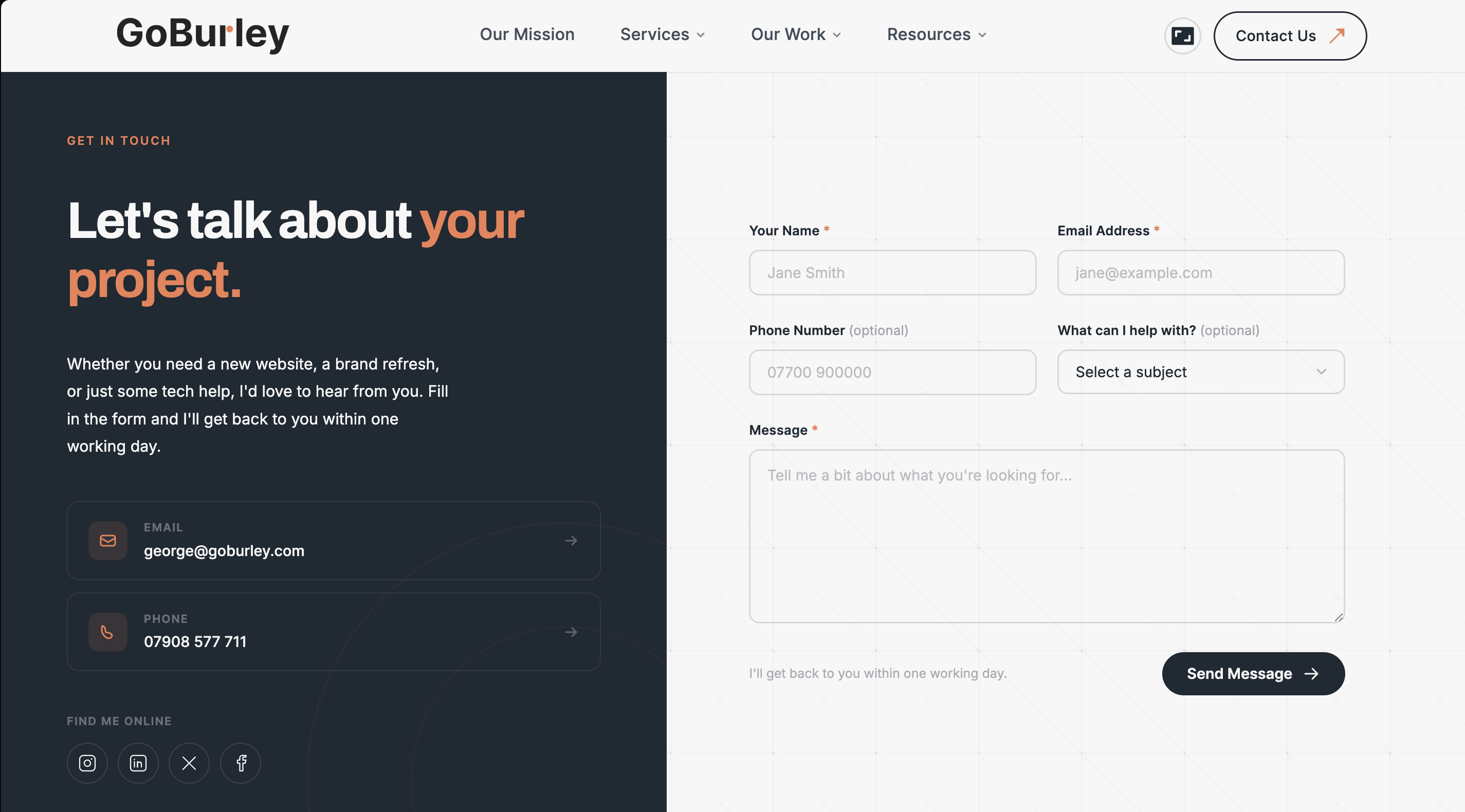
That's my own contact form. Name, email, and a message. Phone and subject are optional, and I ask nothing I don't actually need to reply to someone.
It's slow, or awkward on a phone
Speed affects whether people stay long enough to read anything. Compress your images first, which is nearly always the biggest win, then defer any JavaScript that isn't needed immediately. If your mobile LCP is still above three seconds after that, the problem is your hosting or your platform.
Deciding what to fix first
Score each idea out of three for likely impact, and out of three for effort. Divide impact by effort, sort the list, start at the top. It's crude and it works.
Start with your homepage hero, your pricing page, and whichever landing page gets the most traffic. On most small business sites those three carry nearly all the enquiries.
If you're going to test properly rather than just change things:
- Change one thing at a time. Two changes and you'll never know which one did it.
- Give it at least two weeks. Four if the page gets under 500 visits a week.
- Don't stop after three days because one version looks ahead. Early data is noise.
- Check results split by device. Something that helps on mobile can quietly hurt desktop.
Worth knowing: Google Optimize was retired in 2023, so any guide telling you to use it is out of date. VWO and Optimizely both have free tiers now.
Honestly though, if you get under a few hundred visits a week, formal A/B testing won't reach a reliable answer in any sensible timeframe. Make the obvious improvements, watch what happens over a month, and don't pretend you have statistical significance you don't have.
Should you just rebuild it?
Usually not yet. A rebuild is expensive, takes months, and wipes out the baseline you'd need to know whether it worked.
Keep tinkering if your tracking works, your traffic is reasonably genuine, and you can point at specific things worth changing.
Rebuild if what you sell has genuinely changed and the site no longer describes it, or recordings show people lost across the whole site rather than stuck at one point, or the thing is built on something so bloated you can't fix the speed without starting again.
A rebuild that launches without fixing the underlying message will reproduce the same conversion rate in a nicer wrapper. I've seen that happen to people who spent thousands.
What this actually costs
The quick wins are genuinely quick. Rewriting a headline, moving a button up the page and adding one real testimonial is an afternoon.
Tests take longer because they need traffic. Two weeks minimum, four to be comfortable.
A full rebuild should only ever come after the diagnosis, not instead of it.
One thing worth knowing if your traffic is mostly new visitors: returning visitors convert at meaningfully higher rates than first-timers across almost every study I've seen. That makes getting people back to your site, whether through email or simply being memorable, one of the better uses of your effort.
The honest version
Most people assume their site doesn't convert because it looks old or because they need more visitors. Both assumptions lead to spending money before anyone has looked at the evidence.
The sites that improve fastest are the ones where somebody spent an hour with GA4 and a phone, found two specific problems, and fixed those. Look before you spend.
If you'd rather someone else did that looking, get in touch and I'll go through it with you. If your site is fine and the real problem is that nobody can find it, that's what the local SEO work on the Growth and Partner care plans is for, and I'll tell you which of the two you actually need rather than selling you both.